
If you’ve opened a Remote Desktop connection file today and been greeted by an unfamiliar orange warning banner: “Caution: Unknown remote connection” then you are not imagining things. Microsoft has introduced new protections as part of its April 2026 cumulative updates for Windows 10 and 11, and they’ve landed on computers across New Zealand this week.
What Is an RDP File?
Remote Desktop Protocol (RDP) is the technology that lets you connect to another computer over the internet such as your office PC from home, a server your IT team manages, or a system your software vendor hosts. An RDP file tells the Remote Desktop Connection app how to connect to a remote computer. Depending on its settings, the file can also share parts of your local device, such as your clipboard, drives, or camera, with the remote computer.
These small files get shared around all the time. Someone emails you a shortcut to connect to a work server. Your IT provider sends you a file to make setup easy. Often, nobody thinks twice about it.
That’s exactly the problem.
Why Cybercriminals Love RDP Files
Threat actors have increasingly abused RDP files in phishing campaigns. The Russian state-sponsored APT29 hacking group has previously used rogue RDP files to remotely steal data and credentials from victims. When opened, these files can connect to attacker-controlled systems and redirect local drives to the connected device, allowing the attacker to steal files and credentials stored on disk. They can also capture clipboard data such as passwords or sensitive text, or redirect authentication mechanisms like smart cards to impersonate users.
In plain terms: someone sends you an RDP file that looks harmless. You open it. Within seconds, your files, clipboard, and login credentials could be visible to a criminal on the other side of the world.
What Microsoft Has Changed
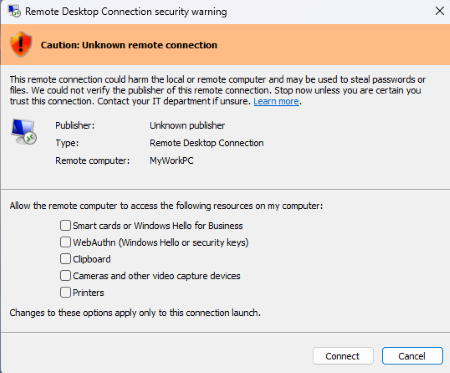
The first time you open an RDP file after installing the update, Windows displays a one-time educational prompt that explains what RDP files do and the risks. From that point on, every RDP file you attempt to open will trigger a security dialog before any connection is established. That dialog tells you whether the file has been digitally signed by a verified publisher, shows you the address of the remote system you are about to connect to, and lists every local resource that the file is trying to redirect, including drives, clipboard access, and connected devices. Crucially, all those redirections are off by default, meaning nothing is shared unless you actively choose to allow it.
What You Need to Do Right Now
This new warning is a feature, not a bug. Treat it seriously.
If you receive an RDP file you weren’t expecting, don’t open it. Even if it comes from a familiar-looking email address, verify it via a separate channel (phone call, Teams message) before proceeding.
Check the remote computer name. If the address shown in the dialog doesn’t match a server or system you recognise and trust, cancel immediately.
Don’t re-enable redirections unless you have a specific reason. Drives, clipboard, cameras, and printers are all turned off by default. Leave them that way unless your IT team tells you otherwise.
If you’re unsure, just ask. That’s what we’re here for.
A Good Security Update, Used Wisely
Microsoft has done the right thing here. The friction of an extra click is a small price to pay for protection against a genuinely dangerous attack vector. The warning is forcing organisations to articulate trust rather than assume it.
For Kiwi businesses accessing remote systems daily, this update is a timely reminder: your IT security is only as strong as the habits of the people using it. Technology can raise the alarm — but you still have to listen.
If your team uses Remote Desktop regularly and you’d like help reviewing your remote access security settings, get in touch with the OutSource team or call 0800 688 768. A quick review now could save you from a very costly breach later.