
If you don’t where it is, you can’t protect it.
Do you know where ALL your organisation’s data is – not physically, but on which web and cloud services?
Here’s the problem. If you don’t where it is, then you can’t protect it. The secondary problem is finding out, because not everyone in your organisation will be onboard. It is common for people to sign up to web services because they offer something useful that helps them do their job.
They sign up using their email address and creating a password. There is the first headache – how does anyone track what has been signed up to across your organisation, let alone who has access to it? If that person leaves, no one will change the account credentials if they don’t know about it, but your ex-colleague still has access.
Secondly, what data do they upload? Is that data that you have a legal or moral responsibility for?
There’s nothing noble about Nobelium.
This isn’t theory – it’s real. USAID is a pretty important US organisation – promoting democracy and human rights around the world. Turns out, someone there was using a well-known email database tool called Constant Contact. But their account wasn’t well protected. Worse still, their account had a huge mailing set up, and of course, it had all the official USAID templates.
So, these Nobelium people, allegedly a Russian state-sponsored hacker group, compromised the Constant Contact account and sent a bulletin out. The bulletin contained malware that allowed the hackers to take command and control over victims computers. Ironically the fake email alleged interference in the US federal elections.

So, what can you do?
The first step is knowing what SaaS tools your people are using. We call this SHADOW IT and it is inevitable. Rather than stopping it, the job IT has is to identify it and manage it. The second step is to secure those platforms. That’s why our KARE for Security S2 plan contains a useful tool to help you identify what services your people are using.
Refer : What We Know About The Apparent Russian Hack Exploiting USAID : NPR
Did you know that Microsoft Word has an option for sharing documents with colleagues so they can read and comment, but not change them?
Review Mode Now you can share documents with colleagues so they can comment, but NOT change your hard work. You can turn it on when you share by clicking on the “People you specify can edit >” line of the sharing window. That will mean they can open your document...

Phishing emails are getting smarter every day
In the old days (ie last year!!), a dodgy email had a whiff to it – there was something that triggered your subconscious. That’s because some phishing emails were really badly written with terrible English. But others just had a sniff about them- something that made...

A cyber-criminal only needs to get lucky once. You have to stay ahead of them all day, every day
"A cybercriminal only has to be lucky once, while a defender has to be lucky every minute of every day.” - Combating Ransomware - A Comprehensive Framework for Action: Key Recommendations from the Ransomware Task Force. The message we hear from governance boards over...
Do you know where all your organisations data is? You don’t know what you don’t know
What is 'Shadow IT'? Shadow IT refers to the various web tools informally in use within most organisations. These tools are often chosen without reference to IT or to management in general. They are often used for all the very best reasons. Your colleagues have work...
Learn why use of Teams is growing at lightspeed
Learn why use of Teams is growing at lightspeed: In this webinar we looked at what new capabilities are driving increased usage. We then discussed which are most applicable to kiwi businesses, to help shortcut your learning on which you can apply to your...

Bad news email attachments
Some emails are more than just bad news No one likes bad news! But sometimes it can’t be helped. Sometimes it sneaks up on you. One of the most common ransomware attacks is through a compromised attachment in an email. It’s easy to say “only open stuff you expect” but...

When you willingly share data, how do you stop it leaking?
Data Leak Protection (DLP) is the name of several policies in Office 365, setting up what data can, and can't be, shared and with whom. Imagine being able to automatically identify private information like passport numbers, Health IDs or bank account details and make...

Newsflash – US Nuclear secrets leaked online through Shadow IT
This sounds like a nightmare that could never happen. US soldiers have been putting sensitive information online in non-secure third party websites. It defies belief, yet we’re reading that it happened. The story popped up on ‘Gizmodo’ . It is alleged that US Soldiers...
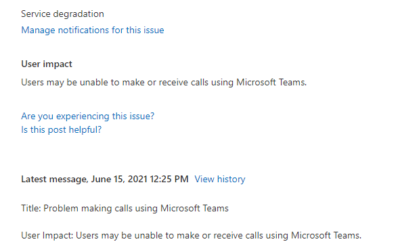
We’re not immune to outages either 🙁
Trans-Tasman outages On the 15th June Microsoft experienced issues across Australia and New Zealand with Teams calling. For Those of us using Microsoft Teams as our phone system, they stopped working. We experienced issues with inbound and outbound calls. The...

“LOCK ‘EM UP AND THROW AWAY THE KEYS”
Password Vaults and You With more and more websites necessary for our everyday activities, it’s getting harder and harder to manage passwords. By now, you will know not to write passwords on post-it notes and paste them on your screen. It's not uncommon for...