
Password Vaults and You
With more and more websites necessary for our everyday activities, it’s getting harder and harder to manage passwords. By now, you will know not to write passwords on post-it notes and paste them on your screen. It’s not uncommon for most people to use the same username and password on a number of sites, particularly on sites we think are less important – for example, hotel websites or some news sites. However, this is a dangerous game to be playing with your information and cyber security.
The problem is that when (not if) your information gets breached, your username and password get into the hands of bad actors who poke and prod other sites on the internet, and test where else you may have used one of these passwords, or a simple variation.
Of course, this is a cyber security challenge. We cannot easily remember hundreds of passwords, especially complex ones. We need an easy way, and we have a solution. A password vault.
But then the question you will ask is, “what happens if the vault is breached?” You need a super-secure vault. Something that easily remembers, (and creates) complex passwords for you and your colleagues – personal and work – and operates on Windows, Mac, and mobiles. It needs to be SOC2 certified so you know it’s secure.
What can a password vault offer you?

- No more remembering dozens of passwords
- Faster access to websites and applications
- Centralised system for both corporate and personal passwords
- Folders to organise and categorise credentials
- Automatic generation of audits and reports to help with tracking and compliance
- Improve the cyber security you provide your colleagues by promoting a password management system you trust
- Use strong password strings to thwart hackers
- Receive a notification of all the passwords of departing employees so clients can remove their access to company systems
- Give clients the tools to granularly grant employee access to employee systems and networks
- Meet compliance measures with comprehensive auditing and reporting capabilities
- Users can access their Site credentials quickly and easily through the native mobile apps on iOS and Android®, auto-fill to log in to websites, and apps on mobile devices
- Cross-browser extension for Google, Chrome, FireFox, Edge, and Chromium-based browsers
What’s your next step?
We’ve created a simple 9-point checklist to help you navigate the cyber-risk landscape and find the right digital security solution for you.
Kinetics can offer you a KARE Password Vault as part of KARE for Security S2 plan or you can subscribe to this standalone for $20 + GST per month for 5 users
Find out more about our Cyber Security Plans here


New cool stuff in your Office 365
[header2 text="New stuff, all the time" align="left" color="#336A40" margintop=""] Microsoft are continually updating Office 365 with awesome new tools and more efficient ways of working. Keeping up with these and learning how to use them is a big challenge, which is...
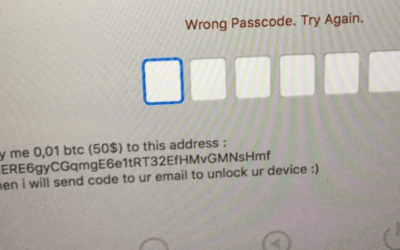
Macs are the latest victims of ransomware
According to Veeam the number of ransomware attacks has jumped 6000% since 2015-16. There is an interesting correlation between the increase in ransom attacks and the increase in value of bitcoins! Bitcoin value in NZ dollars. Source Google Finance Now we...
Seamless migration to cloud file storage
"We've been very fortunate to have them on board. Our transition went very smoothly. There was a great sense of comfort about them and they are very professional in what they do." - Jeremy Sole, CEO SharePoint migration Making the change from local file storage to...

Member training for the EMA
"For anyone thinking of using Kinetics for training : you're going to get value for money, on topic training. Definitely thumbs up." - David Foley, EMA Learning Manager Member IT training The EMA turned to Kinetics when they wanted to provide members...
No excuses for ugly PowerPoint slides
Add a design eye to give some pizzazz to your PowerPoint Not everyone has an eye for design – particularly when it comes to PowerPoint. Now you can get PowerPoint to design your slides for you. 1. Add the text and content you wish to display on your slide. The...
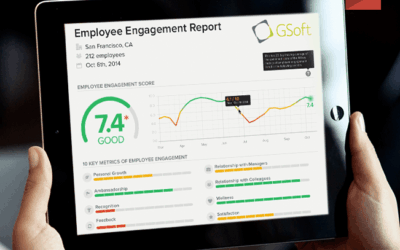
Sensing your office Vibe
As Kinetics had grown, our ability to understand what everyone in the team is feeling or thinking has diminished. The distance that growth brings between staff and managers creates doubts and misunderstandings that can be hard to see. More and more we have...
BEWARE THE FAKE LOGIN
Most people will be familiar with the concept of linking something to your Facebook login. Many sites offer you the opportunity to login using your Facebook account. Scammers use this concept to farm credentials for other sites. One we have started seeing more...
Microsoft 2017 Country Partner of the year!
[header2 text="THE SECRET TO OUR SUCCESS... IS OUR CLIENTS" align="left" color="#336A40" margintop=""] On top of our recent Cloud Productivity award, Microsoft have just announced Kinetics as their overall New Zealand 2017 Partner of the Year. We love doing what we...
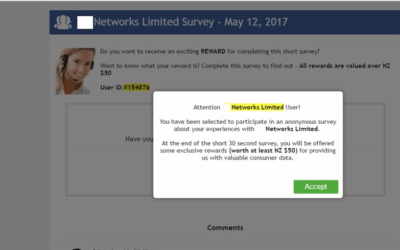
A simple but effective hack is back
[header2 text="We've seen this several times in the last few weeks" align="left" color="#336A40" margintop=""] A classic phishing technique has been updated and is reaping rewards for hackers. Delivery is by email or web popup. You are asked to take a survey (often...
Security Alert – WannaCry
There is currently a worldwide security alert associated with the latest ransomware attack - 'WannaCry'. Media coverage has been heightened as the exploit itself was originally discovered by the NSA in the US. Further newsworthiness was added when the first notified...