
Password Vaults and You
With more and more websites necessary for our everyday activities, it’s getting harder and harder to manage passwords. By now, you will know not to write passwords on post-it notes and paste them on your screen. It’s not uncommon for most people to use the same username and password on a number of sites, particularly on sites we think are less important – for example, hotel websites or some news sites. However, this is a dangerous game to be playing with your information and cyber security.
The problem is that when (not if) your information gets breached, your username and password get into the hands of bad actors who poke and prod other sites on the internet, and test where else you may have used one of these passwords, or a simple variation.
Of course, this is a cyber security challenge. We cannot easily remember hundreds of passwords, especially complex ones. We need an easy way, and we have a solution. A password vault.
But then the question you will ask is, “what happens if the vault is breached?” You need a super-secure vault. Something that easily remembers, (and creates) complex passwords for you and your colleagues – personal and work – and operates on Windows, Mac, and mobiles. It needs to be SOC2 certified so you know it’s secure.
What can a password vault offer you?

- No more remembering dozens of passwords
- Faster access to websites and applications
- Centralised system for both corporate and personal passwords
- Folders to organise and categorise credentials
- Automatic generation of audits and reports to help with tracking and compliance
- Improve the cyber security you provide your colleagues by promoting a password management system you trust
- Use strong password strings to thwart hackers
- Receive a notification of all the passwords of departing employees so clients can remove their access to company systems
- Give clients the tools to granularly grant employee access to employee systems and networks
- Meet compliance measures with comprehensive auditing and reporting capabilities
- Users can access their Site credentials quickly and easily through the native mobile apps on iOS and Android®, auto-fill to log in to websites, and apps on mobile devices
- Cross-browser extension for Google, Chrome, FireFox, Edge, and Chromium-based browsers
What’s your next step?
We’ve created a simple 9-point checklist to help you navigate the cyber-risk landscape and find the right digital security solution for you.
Kinetics can offer you a KARE Password Vault as part of KARE for Security S2 plan or you can subscribe to this standalone for $20 + GST per month for 5 users
Find out more about our Cyber Security Plans here


SIM Swapping Hijacking Cybercrime defeats (some) Multifactor Authentication
Today, its absolutely vital that you have multi-factor authentication on every key website you access, especially banking ones. In some cases, the multi-factor response is by way of a SMS text message sent to your phone, that you then enter into the website. Imagine...
Top Microsoft Teams Tips to Keep Your Team Together
People are already feeling strain with the rapidly changing face of Covid-19. Stress and tensions are naturally high and for many organisations this could be first time they have asked people to work remotely for extended periods. It’s definitely not our New...

Making it Work When Working From Home
Working remotely can be invigorating from time to time, but there’s a reason why we don’t do it permanently. If we’re forced to work remotely for a long period, how do we overcome isolation effects? Working together in an office has a number of social benefits. You...
Get a free copy of our COVID19 Business Readiness Kit
In this kit,we’ll take a look at how you can effectively check your systems, processes, and people are ready for the impacts of COVID19. We’ll explore the key things you need to consider relating to: The tools you use and how...
Covid-19 (CoronaVirus) and your IT
No amount of AntiVirus software will help with this one! Whether this is a "Black Swan" event or not, it's certainly having an impact. As I write this, there are stories of panic buying of hand sanitiser and face masks at the local supermarkets. That means it's...

Google Chrome – Urgent Security Warning
Security Advisory – Google Chrome Google has reported a security issue in the Chrome browser. This issue is known to attackers and it is already being exploited by some. All versions of Chrome are affected. Google have released an update for...

Are you really at threat from Cyber-Crime? 2 trillion reasons to say YES.
In New Zealand, the National Cyber Security Centre (NZ Govt - https://www.ncsc.govt.nz/ reports they reduced harm in NZ by $27.7 million in 2018/19. We know that’s just the tip of the iceberg – most cyber crime still goes unreported and certainly doesn’t get stopped...
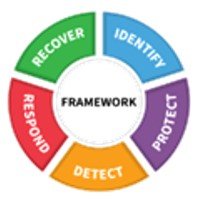
With yet another IT security warning from the NSA, we’re being asked “so what is best practice?”
Aligning with NIST.....? Is your Cybersecurity protection matching best practice? Clearly the cybersecurity stakes are higher. The security precautions that used to be reasonable are no longer enough. Stakeholders expect businesses to do more – whether it’s your...
What will the 20’s decade bring?
There’s a debate raging in our office as to whether the new decade begins this year, 2020, or next, 2021. Regardless, we can all agree on the vast change in everyday technology since 2010. It’s a great time to reflect on what we might see in the next ten years, using...
Is your Bluetooth safe?
Bluetooth has become ubiquitous. We use it to connect our phones, laptops, keyboards, mice, headphones, speakers, cars – more and more each day. Even watches now! It seems to have got easier, maybe because we’re so practised with it. Bluetooth is everywhere. ...