
Password Vaults and You
With more and more websites necessary for our everyday activities, it’s getting harder and harder to manage passwords. By now, you will know not to write passwords on post-it notes and paste them on your screen. It’s not uncommon for most people to use the same username and password on a number of sites, particularly on sites we think are less important – for example, hotel websites or some news sites. However, this is a dangerous game to be playing with your information and cyber security.
The problem is that when (not if) your information gets breached, your username and password get into the hands of bad actors who poke and prod other sites on the internet, and test where else you may have used one of these passwords, or a simple variation.
Of course, this is a cyber security challenge. We cannot easily remember hundreds of passwords, especially complex ones. We need an easy way, and we have a solution. A password vault.
But then the question you will ask is, “what happens if the vault is breached?” You need a super-secure vault. Something that easily remembers, (and creates) complex passwords for you and your colleagues – personal and work – and operates on Windows, Mac, and mobiles. It needs to be SOC2 certified so you know it’s secure.
What can a password vault offer you?

- No more remembering dozens of passwords
- Faster access to websites and applications
- Centralised system for both corporate and personal passwords
- Folders to organise and categorise credentials
- Automatic generation of audits and reports to help with tracking and compliance
- Improve the cyber security you provide your colleagues by promoting a password management system you trust
- Use strong password strings to thwart hackers
- Receive a notification of all the passwords of departing employees so clients can remove their access to company systems
- Give clients the tools to granularly grant employee access to employee systems and networks
- Meet compliance measures with comprehensive auditing and reporting capabilities
- Users can access their Site credentials quickly and easily through the native mobile apps on iOS and Android®, auto-fill to log in to websites, and apps on mobile devices
- Cross-browser extension for Google, Chrome, FireFox, Edge, and Chromium-based browsers
What’s your next step?
We’ve created a simple 9-point checklist to help you navigate the cyber-risk landscape and find the right digital security solution for you.
Kinetics can offer you a KARE Password Vault as part of KARE for Security S2 plan or you can subscribe to this standalone for $20 + GST per month for 5 users
Find out more about our Cyber Security Plans here


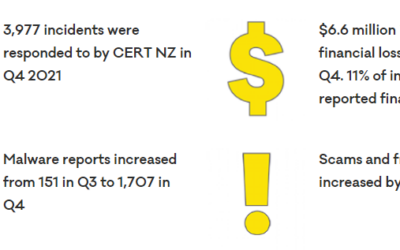
Hot off the press – we have just received CERT NZ’s report for the last quarter of 2021
So, just a quick reminder of who CERT NZ are – it’s the official NZ Government Cyber-Security agency. So, first up – 13% increase in reported incidents on the previous year and a big spike into the last quarter. 9% more phishing attacks. 24% more malware, based on the...
Are your staff or volunteers your organisation’s biggest security risk?
Despite the best technology defenses (next-gen firewalls and antivirus, advanced threat protection, mail washing, web filtering, regular patching) infections and security events can still occur due to what is often the biggest risk – your people People-risk is harder...
Is your IT strategy meeting the business needs of your community?
There’s a saying that goes “A goal without a plan is a wish." With that in mind, does your organisation have an IT Strategy? Is it aligned with your board's business plan? The reason this is important is that it allows you to make better decisions and be more...
Is the board doing enough to get the cyber-security cost/risk balance right?
Is your organisation doing enough to get the cyber-security cost/risk balance right? Cyber-security protection can feel like an unending cost. Is your board aware of their obligations to your not-for-profit? Are they aware of the unique risks that most NFP's...
Does your NFP have the right relationship with your IT provider?
Do you have the right relationship with your IT provider? Regardless of whether your IT provider is your in-house IT team or a trusted business provider, do you have the right relationship with them? The right IT provider will ask "WHY" long before they ask "WHAT" and...
Does your Not-For-Profit have the right data privacy policy?
Data privacy is now a hot topic in NZ. This was driven by three main factors: 1. The GDPR (General Data Protection Regulation) which came into effect in Europe in May 2018. This introduced strict regulations on what private information is, how to get consent from...
When hacking can help.
Ukraine is pretty well known for tech innovation. In fact it was worth $US6.8 Billion last year Ukraine’s Booming Tech Outsourcing Sector at Risk After Russian Invasion - WSJ. On top of that ‘legitimate’ work, Ukraine has also been home to some of the...

Sigh! How dumb and immoral can hackers get?
You can only sigh! We are witness astounding bravery and inspirational leadership in the Ukraine. We are watching the unfortunate abandoning everything they have built up to become refugees as they flea the dangers. The world is heartbroken. But amongst us there are...
Who really controls your organisation’s IT systems and your data?
Do you know who owns and leases your operational equipment, or your buildings, plant and other physical facilities..Can you say who controls your IT? How flexible is your IT supply chain to meet your not-for-profit's ongoing needs? You exist to serve your community -...
Are you maximising your Not-For-Profit’s technology investment?
Every organisation has to be careful when making IT investments - as everyone has competing projects demanding attention. It seems even more heightened in the not-for-profit sector when reducing money needed for infrastructure frees up resources for community...