
Password Vaults and You
With more and more websites necessary for our everyday activities, it’s getting harder and harder to manage passwords. By now, you will know not to write passwords on post-it notes and paste them on your screen. It’s not uncommon for most people to use the same username and password on a number of sites, particularly on sites we think are less important – for example, hotel websites or some news sites. However, this is a dangerous game to be playing with your information and cyber security.
The problem is that when (not if) your information gets breached, your username and password get into the hands of bad actors who poke and prod other sites on the internet, and test where else you may have used one of these passwords, or a simple variation.
Of course, this is a cyber security challenge. We cannot easily remember hundreds of passwords, especially complex ones. We need an easy way, and we have a solution. A password vault.
But then the question you will ask is, “what happens if the vault is breached?” You need a super-secure vault. Something that easily remembers, (and creates) complex passwords for you and your colleagues – personal and work – and operates on Windows, Mac, and mobiles. It needs to be SOC2 certified so you know it’s secure.
What can a password vault offer you?

- No more remembering dozens of passwords
- Faster access to websites and applications
- Centralised system for both corporate and personal passwords
- Folders to organise and categorise credentials
- Automatic generation of audits and reports to help with tracking and compliance
- Improve the cyber security you provide your colleagues by promoting a password management system you trust
- Use strong password strings to thwart hackers
- Receive a notification of all the passwords of departing employees so clients can remove their access to company systems
- Give clients the tools to granularly grant employee access to employee systems and networks
- Meet compliance measures with comprehensive auditing and reporting capabilities
- Users can access their Site credentials quickly and easily through the native mobile apps on iOS and Android®, auto-fill to log in to websites, and apps on mobile devices
- Cross-browser extension for Google, Chrome, FireFox, Edge, and Chromium-based browsers
What’s your next step?
We’ve created a simple 9-point checklist to help you navigate the cyber-risk landscape and find the right digital security solution for you.
Kinetics can offer you a KARE Password Vault as part of KARE for Security S2 plan or you can subscribe to this standalone for $20 + GST per month for 5 users
Find out more about our Cyber Security Plans here



Experience Virtual Reality today – available NOW in your Microsoft Teams
A curious little update appeared in Microsoft Teams recently, with very little fanfare. Have you noticed the “3D Immersive Experience” ? It’s called “Microsoft Mesh” It seems this is available through a range of interfaces, but the one we are interested in is Teams,...
Is MFA enough? – the need for multiple cyber security layers.
At Kinetics, we've always emphasized the importance of multi-factor authentication (MFA) as a critical layer in cybersecurity. Without MFA, it's only a matter of time before you fall victim to a cyber attack. However, as we've also mentioned, no single defense is...
Securing your Mac
It does not seem that long ago I would hear Mac users say “I don’t need Anti-Virus”, or "Mac’s are not affected". To a certain extent they were right. Apple's use of tightly controlled application approvals reduced the surface area for attack. Mac users did not enjoy...
How secure is your cloud IT? Is it as safe as you expect?
Your cloud computing can be safe and secure, or open and vulnerable - the choice is yours. With the rise of hacker activity and cybercrime, it’s essential to lock down your cloud and protect it from threats. For most businesses, the standard 365 settings aren't...

What would you do Canterbury? Incident Response Workshop
Mastering Cybersecurity What would you do? Table-top exercise Join us for an interactive table-top simulation exercise. Imagine - you are busy going about your day when suddenly your meeting is interrupted. "No one can access their files" or "We just accidently paid...
Webinar Replay: AVD – the future of secure remote access to non-365/web-based software
In this cloud world, are virtual desktops still relevant? How can work-from-anywhere be MORE flexible, easy and cost-effective?This webinar replay is a must-watch if want: To cost-effectively add cyber-security for remote workers on personal devices Easily access...

Have you met Microsoft Loop?
Have you noticed the Microsoft Loop icon in your 365 screen? (It's been there for a few months) Loop is a comparatively new collaborative app that allows users to create, share, and work together on various types of content, including notes, tables, lists, and more....
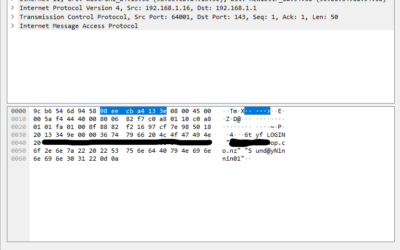
Are your legacy IT systems giving hackers a backdoor into your business?
One of our engineers was working on migrating a customer from a legacy email server into Office 365 after we discovered they were under a brute force external attack. The migration required that we receive the users passwords. These would, of course, be reset after...
Empower your non-profit with the latest Microsoft Technology, including Co-Pilot (Auckland)
Empower your non-profit with the latest Microsoft TechnologyThis in-person Masterclass will highlight Microsoft's "Tech for Social Impact" initiative that aims to accelerate digital transformation across the Not-for-Profit/For-Purpose sector globally, so they can have...
Is your Teams calling giving the actionable data you need?
Like many businesses, we rely on Microsoft Teams for our messaging and voice/video calling It's easy to use, works well on all our devices and is highly reliable. But the standard reporting wasn't working for us. We were completely frustrated We knew our...