
Password Vaults and You
With more and more websites necessary for our everyday activities, it’s getting harder and harder to manage passwords. By now, you will know not to write passwords on post-it notes and paste them on your screen. It’s not uncommon for most people to use the same username and password on a number of sites, particularly on sites we think are less important – for example, hotel websites or some news sites. However, this is a dangerous game to be playing with your information and cyber security.
The problem is that when (not if) your information gets breached, your username and password get into the hands of bad actors who poke and prod other sites on the internet, and test where else you may have used one of these passwords, or a simple variation.
Of course, this is a cyber security challenge. We cannot easily remember hundreds of passwords, especially complex ones. We need an easy way, and we have a solution. A password vault.
But then the question you will ask is, “what happens if the vault is breached?” You need a super-secure vault. Something that easily remembers, (and creates) complex passwords for you and your colleagues – personal and work – and operates on Windows, Mac, and mobiles. It needs to be SOC2 certified so you know it’s secure.
What can a password vault offer you?

- No more remembering dozens of passwords
- Faster access to websites and applications
- Centralised system for both corporate and personal passwords
- Folders to organise and categorise credentials
- Automatic generation of audits and reports to help with tracking and compliance
- Improve the cyber security you provide your colleagues by promoting a password management system you trust
- Use strong password strings to thwart hackers
- Receive a notification of all the passwords of departing employees so clients can remove their access to company systems
- Give clients the tools to granularly grant employee access to employee systems and networks
- Meet compliance measures with comprehensive auditing and reporting capabilities
- Users can access their Site credentials quickly and easily through the native mobile apps on iOS and Android®, auto-fill to log in to websites, and apps on mobile devices
- Cross-browser extension for Google, Chrome, FireFox, Edge, and Chromium-based browsers
What’s your next step?
We’ve created a simple 9-point checklist to help you navigate the cyber-risk landscape and find the right digital security solution for you.
Kinetics can offer you a KARE Password Vault as part of KARE for Security S2 plan or you can subscribe to this standalone for $20 + GST per month for 5 users
Find out more about our Cyber Security Plans here



Copilot Update – How the AI is getting more useful
Copilot keeps getting better and better. We’re going to keep you updated on developments as we become aware of them. Firstly, make sure you have the Copilot app on your phone. You can download it here. It will create imagery, write content and even work with photos...
Lessons from the Change Healthcare attack. Why MFA Matters
By now, regular readers know how important MFA is. Unbelievably, there are still some people who think this is for someone else, and they don't need it themselves. Unfortunately, we are seeing some of these people fall victim to the very scams we've been writing...
Two Windows 11 changes coming this month (June 2024)
"Please wait" and "update installing" are completely frustrating. You have things to do, and you have to wait for Windows to update. Be warned, there is another update coming this month, although you can preview it sooner if you want.So, what can you expect? Our...

What happened when we got told we’d been hacked?
“We’ve been hacked”. When you hear that the world stops. What does this mean? How bad is it? How can we manage that? That was the news earlier this week. It was quite confronting! Suddenly your careful plans for the day are thrown aside as your priorities have...
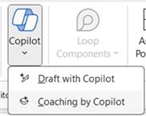
Are you getting results from Copilot?
By now, most people will have seen Copilot in their browser, and for those that are subscribing, Copilot is now an icon in your Office documents. The benefit is that it helps you write material, like this article, quickly and to a high standard. I asked Copilot for an...

Can VPNs be defeated?
We’re reading about a flaw called ‘TunnelVision’ that could give hackers access to overcome virtually any VPN security solutions. It works by manipulating routing in DHCP, which is the mechanism networks use to hand out IP addresses to devices. DHCP has been around...
What are the next steps for your AI Journey? (How to be Copilot ready)
Are you ready for Microsoft Copilot? How do you build your practical AI roadmap? How will you ensure your people embrace the opportunity, that your data is ready, that the skills to use AI are in place and you have the right AI governance in place. How will you...
Will some of your emails stop?
Microsoft Exchange Online to retire Basic authentication We are going to face a big change coming in September 2025, Microsoft is going to be disabling SMTP Basic Authentication. This continues work they commenced a couple years ago to disable other protocols such as...
Webinar Replay: Embrace Generative AI today. Copilot for Microsoft 365
Free Webinar Replay : Embrace Generative AI today with Copilot for Microsoft 365 services from Kinetics Group AI for Microsoft 365 is here and available now.Learn how you can use Copilot to save hours every day. Transform your daily workflow with Copilot for Microsoft...
How to create passwords that hackers hate
A guide to making your online accounts more secure and less boring Have you ever used your birthday, your pet's name, or the word "password" as your password? If so, you're not alone. According to a study by NordPass, these are some of the most common and worst...