
Password Vaults and You
With more and more websites necessary for our everyday activities, it’s getting harder and harder to manage passwords. By now, you will know not to write passwords on post-it notes and paste them on your screen. It’s not uncommon for most people to use the same username and password on a number of sites, particularly on sites we think are less important – for example, hotel websites or some news sites. However, this is a dangerous game to be playing with your information and cyber security.
The problem is that when (not if) your information gets breached, your username and password get into the hands of bad actors who poke and prod other sites on the internet, and test where else you may have used one of these passwords, or a simple variation.
Of course, this is a cyber security challenge. We cannot easily remember hundreds of passwords, especially complex ones. We need an easy way, and we have a solution. A password vault.
But then the question you will ask is, “what happens if the vault is breached?” You need a super-secure vault. Something that easily remembers, (and creates) complex passwords for you and your colleagues – personal and work – and operates on Windows, Mac, and mobiles. It needs to be SOC2 certified so you know it’s secure.
What can a password vault offer you?

- No more remembering dozens of passwords
- Faster access to websites and applications
- Centralised system for both corporate and personal passwords
- Folders to organise and categorise credentials
- Automatic generation of audits and reports to help with tracking and compliance
- Improve the cyber security you provide your colleagues by promoting a password management system you trust
- Use strong password strings to thwart hackers
- Receive a notification of all the passwords of departing employees so clients can remove their access to company systems
- Give clients the tools to granularly grant employee access to employee systems and networks
- Meet compliance measures with comprehensive auditing and reporting capabilities
- Users can access their Site credentials quickly and easily through the native mobile apps on iOS and Android®, auto-fill to log in to websites, and apps on mobile devices
- Cross-browser extension for Google, Chrome, FireFox, Edge, and Chromium-based browsers
What’s your next step?
We’ve created a simple 9-point checklist to help you navigate the cyber-risk landscape and find the right digital security solution for you.
Kinetics can offer you a KARE Password Vault as part of KARE for Security S2 plan or you can subscribe to this standalone for $20 + GST per month for 5 users
Find out more about our Cyber Security Plans here


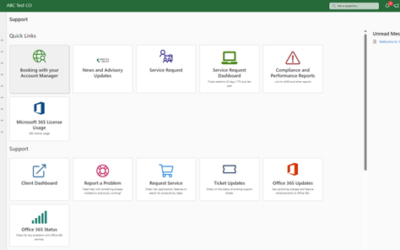
New reports in your Kinetics Portal
Thank you for the great feedback about our new client portal. Even so, we're not stopping there! We are already rolling out new capabilities to it. We're adding new reports, scheduled for availabilty in November. When you check your reports in the Client Portal,...
Webinar Replay: Are you (really) insured for a cyber-attack Trends in cyber- insurance and what you can expect
Are you (really) insured for a cyber-attack? Learn the latest trends in cyber- insurance and what you can expect.The latest CertNZ data tells us that 43% of cyber-attacks in NZ were aimed at small business. Even worse is the number of businesses that cease trading as...

Oh no, the worst has happened! Now what?
When we talk to people about the different risks that their organisation might face, one of the events that has the highest likelihood, and would have the biggest impact, is a significant cyber-event. The worst-case scenario would be a ransomware event, where the bad...
What can you expect in Windows 11 Update 24H2?
Enhancing User Experience with the Latest Microsoft Update for Windows 11.Microsoft has recently unveiled a new release that promises to bring a host of improvements and features designed to enhance user experience and performance. This release includes several...

The History and Innovations of Bluetooth and NFC: Understanding Their Potential and Risks
Bluetooth and NFC share several similarities. Both technologies utilise short-range wireless communication to facilitate the exchange of data between devices without the need for physical connectors. They have revolutionised modern conveniences such as contactless...
New Features in Microsoft Teams Whiteboard
Recent updates to the Microsoft Teams Whiteboard app bring whiteboard interactivity to Teams meetings. Sticky Notes: Easily add and move sticky notes around the board to organize thoughts and ideas. This is particularly useful for brainstorming sessions and agile...
Copilot AI Readiness Workshop Registration Successful
Thank you for registering! Workshop Details Date: 1 May (Thursday) Time: 8.45 coffee ahead of a 9.00am start Location: Kinetics Group, Level 1, 11 Leslie Hills Drive, Riccarton, Christchurch 8011 We look forward to seeing you there and helping you get more from...
Is your 365 data ready for Copilot and AI? (Christchurch free event)
Don't miss out - Limited Places Reserve your seat today Date: 22 October (Tuesday) Time: 8.45 coffee ahead of a 9.00am start Location: Kinetics Group, Level 1, 11 Leslie Hills Drive, Riccarton, Christchurch 8011Join us for an interactive free workshop AI and Microsoft...
DEAF Aotearoa’s lasting partnership with Kinetics
Not-For-Profit finds consistent value over time Over the course of more than a decade, not-for-profit Deaf Aotearoa has benefited from consistent value from its relationship with managed services provider Kinetics. Deaf Aotearoa is the national organisation...
What is happening with NZ Cyber crime?
SME Cyber Security InsightsThe National Cyber Security Centre (formerly NZ Cert) sheds light on the cyber security practices of small and medium-sized enterprises (SMEs) in New Zealand. These insights are crucial, especially given the evolving threat landscape. Here...