
Password Vaults and You
With more and more websites necessary for our everyday activities, it’s getting harder and harder to manage passwords. By now, you will know not to write passwords on post-it notes and paste them on your screen. It’s not uncommon for most people to use the same username and password on a number of sites, particularly on sites we think are less important – for example, hotel websites or some news sites. However, this is a dangerous game to be playing with your information and cyber security.
The problem is that when (not if) your information gets breached, your username and password get into the hands of bad actors who poke and prod other sites on the internet, and test where else you may have used one of these passwords, or a simple variation.
Of course, this is a cyber security challenge. We cannot easily remember hundreds of passwords, especially complex ones. We need an easy way, and we have a solution. A password vault.
But then the question you will ask is, “what happens if the vault is breached?” You need a super-secure vault. Something that easily remembers, (and creates) complex passwords for you and your colleagues – personal and work – and operates on Windows, Mac, and mobiles. It needs to be SOC2 certified so you know it’s secure.
What can a password vault offer you?

- No more remembering dozens of passwords
- Faster access to websites and applications
- Centralised system for both corporate and personal passwords
- Folders to organise and categorise credentials
- Automatic generation of audits and reports to help with tracking and compliance
- Improve the cyber security you provide your colleagues by promoting a password management system you trust
- Use strong password strings to thwart hackers
- Receive a notification of all the passwords of departing employees so clients can remove their access to company systems
- Give clients the tools to granularly grant employee access to employee systems and networks
- Meet compliance measures with comprehensive auditing and reporting capabilities
- Users can access their Site credentials quickly and easily through the native mobile apps on iOS and Android®, auto-fill to log in to websites, and apps on mobile devices
- Cross-browser extension for Google, Chrome, FireFox, Edge, and Chromium-based browsers
What’s your next step?
We’ve created a simple 9-point checklist to help you navigate the cyber-risk landscape and find the right digital security solution for you.
Kinetics can offer you a KARE Password Vault as part of KARE for Security S2 plan or you can subscribe to this standalone for $20 + GST per month for 5 users
Find out more about our Cyber Security Plans here



What’s coming to Windows next?
The Windows 11 changes keep coming. Some are big and some are small. Some need additional licenses (like Copilot) and others are there for everyone. These are 'rolling out' so we can't tell you exactly when you will see them on your screen.1. Start Talking to...
CHRISTCHURCH IN-PERSON Hands-on Copilot skills workshop
Join us for an interactive free session About the Workshop This workshop is designed to provide you with an in-depth understanding of Copilot and its myriad applications. Ben Fish, our in-house Copilot expert, will guide you through practical exercises and real-world...
AUCKLAND IN-PERSON Hands-on Copilot skills workshop
Join us for an interactive free session About the Workshop This workshop is designed to provide you with an in-depth understanding of Copilot and its myriad applications. Dinesh Raj, from our in-house Copilot team, will guide you through practical exercises and...
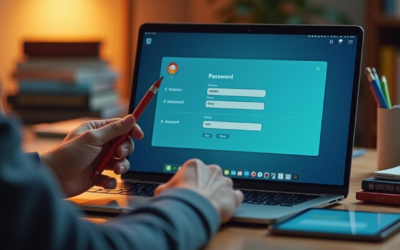
Webinar Replay – 5 mistakes people often make with passwords and how to overcome them
Passwords are the first line of defence against cyber threats. However, many people still make common mistakes that leave their accounts vulnerable. Watch this video for a 30-minute webinar where we will discuss the most frequent password pitfalls and how to avoid...

How can you use Microsoft Secure Score to protect your organisation?
Enhancing Your Security Posture with Microsoft Secure Score Microsoft Secure Score is a powerful tool designed to help businesses assess and improve their security across Microsoft 365 workloads. With over a million organisations worldwide using Microsoft software,...

Are (Software) Easter Eggs still used?
Reminder - What's an Easter Egg? The concept of Easter Eggs in software began with Warren Robinett, the developer of the Atari 2600 game "Adventure." Frustrated by the lack of recognition for game designers, Robinett secretly included a hidden room in the game that...
Welcome OutSource IT
Welcoming OutSource IT to the Kinetics GroupWe’re excited to share some great news - on April 1, OutSource IT officially joined the Kinetics Group of companies. This is a fantastic step forward, not just for Outsource IT and Kinetics, but most importantly for you -...

Introducing the Windows 11 Roadmap
Windows 11 keeps changing. Regular updates that roll out every 6 months result in different features. We frequently highlight the most obvious of those in this news platform, and we will continue to do so.But you don’t need to wait for us! A few days ago, Microsoft...
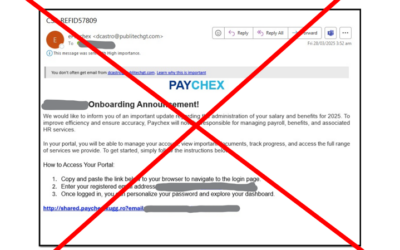
Who’s been paying attention?
We’re really proud of our clients! Last week, these little pieces of ill-intentioned mischief popped up for a couple of the businesses we look after.They were smart enough to evade anti-spam software but not the cyber-training. Although the emails look legitimate,...

March AI Digest
Here are a few of the headlines that caught our eye in the world of AI in March. Nvidia's share price fell after DeepSeek's rise but soon rebounded, backed by $39.33 billion in revenue, exceeding forecasts. Nevertheless, new chip tech from Meta, Google, and...